Key Takeaways
- Converting crypto to GCash lets you use digital assets for payments, bills, shopping, and ATM withdrawals instantly in the Philippines.
- GCash is widely accepted, regulated by BSP, and links to banks, making it a secure platform for converting and spending cryptocurrency.
- GCrypto provides a fast, integrated alternative, letting you convert supported cryptocurrencies directly into GCash without external wallets.
In the Philippines, the demand for fast and convenient ways to access digital money is continuously increasing, with mobile wallets becoming a key part of everyday financial transactions. Among these, GCash has emerged as one of the most widely used platforms, allowing users to pay bills, shop online, and transfer money instantly. For cryptocurrency holders, converting digital assets into GCash provides a practical way to use crypto for daily expenses.
This article covers the step-by-step process, highlighting the safest, quickest, and most efficient methods to convert cryptocurrencies into GCash funds, so you can easily integrate digital currencies into your everyday financial activities.
What is GCash?
GCash is one of the leading mobile wallets in the Philippines, offering a full-featured digital financial platform that lets users send and receive money, pay bills, purchase mobile load, shop online, and even invest or save, all directly from their smartphones. The app is linked to major local banks, payment systems, and partner merchants, making it a convenient tool for cashless transactions.
By converting cryptocurrencies into GCash, users can access the real-world utility of their digital assets, enabling everyday spending and payments without a traditional bank account or physical cash. This makes it an ideal solution for using crypto in daily life, whether for personal use or business transactions.
Why Convert Crypto to GCash?
Converting cryptocurrency to GCash offers several practical advantages for users in the Philippines:
- Instant Access to Funds – Once your crypto is converted, funds are immediately available in your GCash wallet, allowing you to pay bills, shop online, or withdraw cash at any time without delay.
- Wide Acceptance – GCash is accepted by thousands of merchants, online platforms, and service providers across the Philippines, making it easy to use your funds for everyday expenses.
- Reduced Reliance on Banks – By using GCash, you can bypass traditional banking systems, avoiding long processing times, account restrictions, and additional fees often associated with conventional bank transfers.
- Safe and Secure Transactions – GCash is regulated by the Bangko Sentral ng Pilipinas (BSP) and incorporates multiple security measures, including OTP verification, biometric login, and app-based encryption, ensuring your funds remain protected.
- Flexible Financial Management – Beyond spending, GCash lets you save, invest, and pay for services such as insurance and loans, giving your converted crypto greater real-world utility and financial flexibility.
Step-by-Step Guide: How to Convert Crypto to GCash
To convert crypto to GCash, verify an account on a trusted exchange or P2P platform such as Coins.ph, PDAX or OKX P2P, sell your crypto for Philippine pesos (PHP), and move the pesos to GCash directly or through a linked bank account. As of February 2026, GCash’s GCrypto feature lets you sell supported crypto inside the app instead.
1. Choose a Trusted Crypto Exchange or P2P Platform
The first step in converting your cryptocurrency to GCash is to select a reliable platform to sell your crypto for Philippine pesos (PHP). Choosing the right service helps ensure your transactions are secure, efficient, and cost‑effective. Good options include:
- Coins.ph: A Philippines-based, Bangko Sentral ng Pilipinas (BSP)-regulated platform that supports crypto trading and direct transfers to GCash for quick PHP deposits.
- PDAX: Local exchange licensed by the BSP with wide crypto support and direct GCash withdrawals.
- OKX P2P: Peer-to-peer marketplace where local buyers can pay you in PHP via GCash, offering flexibility for global users.
When choosing a platform, consider fees, supported cryptocurrencies, and the transaction speed.
2. Create and Verify Your Account
- Sign Up – Register on your chosen platform using a valid email address or mobile number. Ensure your information is accurate to prevent delays in verification or withdrawal processing.
- Complete Identity Verification (KYC) – Most platforms require KYC for security and compliance. Upload a government-issued ID and a selfie to protect your account and increase withdrawal limits.
- Link Your GCash Number – If the platform allows direct transfers, add your verified GCash-linked number. If not, withdraw to a linked bank account and then transfer to GCash. Make sure your GCash account is verified to avoid delays.
3. Sell Your Crypto
- Select Cryptocurrency – Choose the digital asset you want to convert, such as Bitcoin, Ethereum, or USDT. Make sure the platform supports the crypto you intend to sell and that it can be converted to PHP.
- Set Transaction Details – Enter the amount you want to sell and select your preferred payment method. For direct transfers, choose GCash if available; otherwise, select a linked bank account. Double-check exchange rates and any applicable fees to avoid unexpected costs.
- Confirm the Sale – Carefully review all transaction details, including the amount, fees, and recipient account, before confirming. Once confirmed, the platform will process the sale and transfer funds to your GCash wallet or bank account.
4. Transfer to GCash
After selling your cryptocurrency, the next step is moving your funds into your GCash wallet. The process depends on the platform you use:
- Direct P2P Transfer: Some platforms allow the buyer to pay directly to your GCash number. The funds appear instantly in your wallet.
- Bank Withdrawal: If your exchange does not support GCash direct withdrawals, withdraw the PHP to a bank account linked to your GCash app. Once the money hits your bank, you can cash in to GCash.
5. Check Your GCash Wallet
After completing the crypto-to-GCash transaction, open the GCash app and log in to your verified account. Go to “Balance” to confirm the converted PHP has been credited correctly.
Once verified, your funds are ready to use for bills, online shopping, transfers, or ATM withdrawals. You can also use your balance for QR payments, GSave, and other GCash features to conveniently access your converted cryptocurrency.
Convert Crypto to GCash via GCrypto (Step‑by‑Step)
As an alternative to exchanges or P2P platforms, GCash’s GCrypto feature lets you convert supported cryptocurrencies directly into Philippine pesos (PHP) within the app. This method is fast, secure, and convenient for using crypto in everyday transactions.
1. Open GCash and Access GCrypto
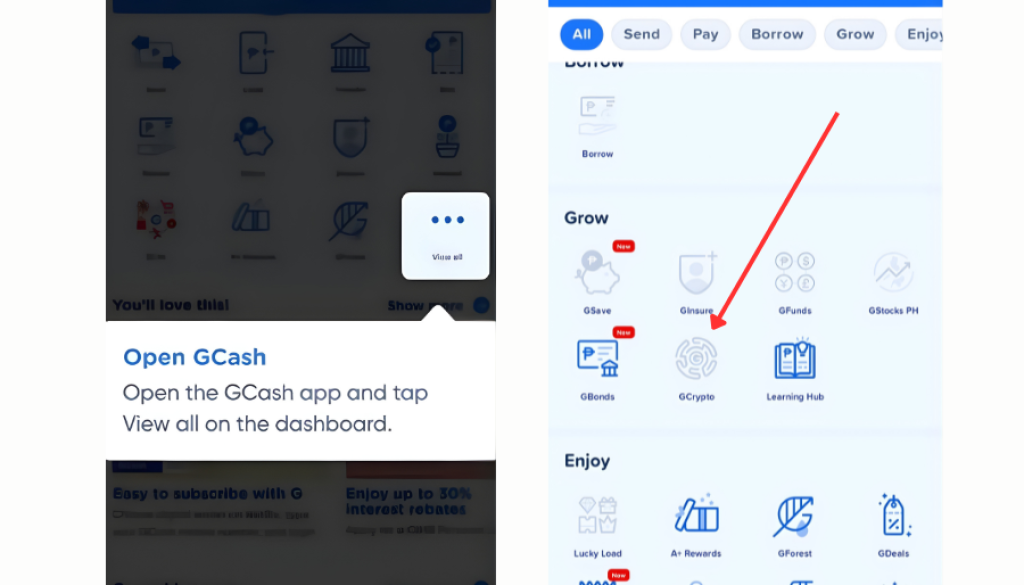
Start by launching the GCash app on your smartphone and logging in to your verified account. From the main dashboard, tap “View All” to see all available features. Then select GCrypto to open GCash’s crypto platform, where you can buy, sell, and convert supported cryptocurrencies directly into Philippine pesos (PHP).
2. Choose the Crypto You Want to Sell
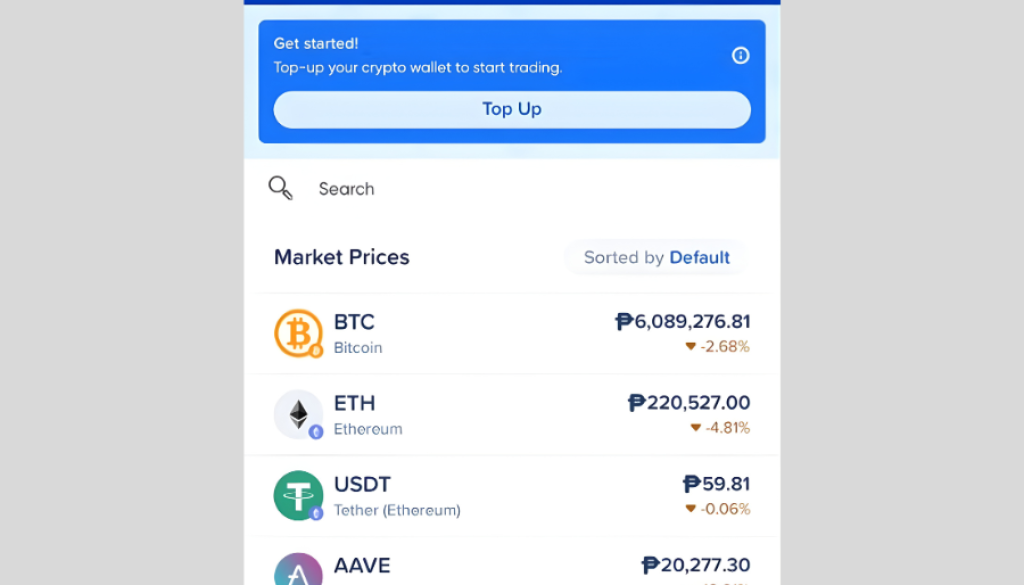
Once you’re inside GCrypto, browse the list of supported cryptocurrencies to locate the coin you hold. Tap on your chosen crypto to open its dedicated page, where you’ll see options such as Buy, Sell, Send, and Receive. Selecting Sell lets you convert your crypto to Philippine pesos (PHP), which are credited directly to your GCash wallet.
3. Tap the “Sell” Button
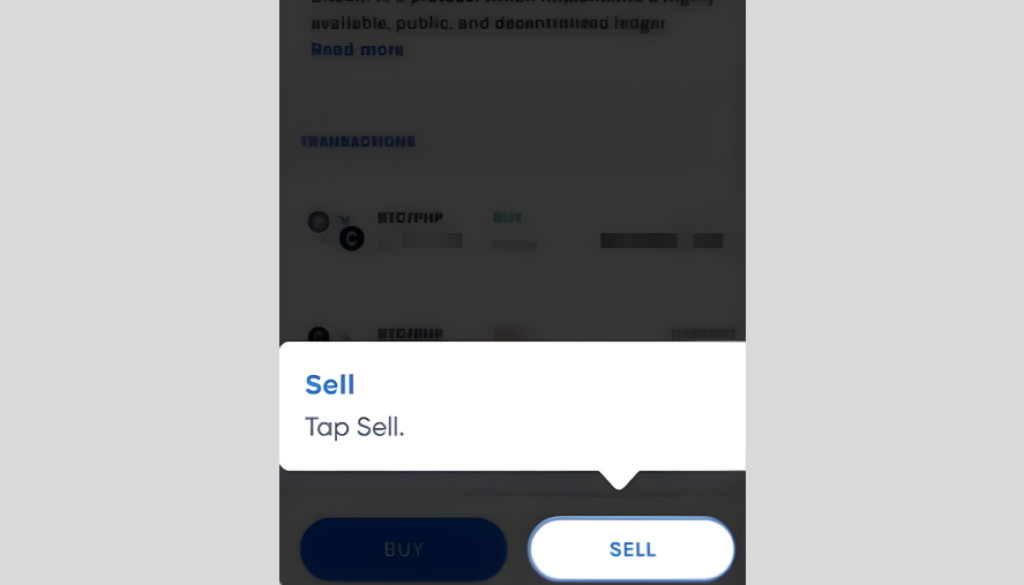
On the cryptocurrency’s page in GCrypto, tap Sell to convert your crypto into Philippine pesos (PHP). Enter the amount in crypto or PHP, then review the exchange rate, fees, and the total PHP amount before confirming to ensure you get the best value.
4. Confirm and Transfer Your Funds
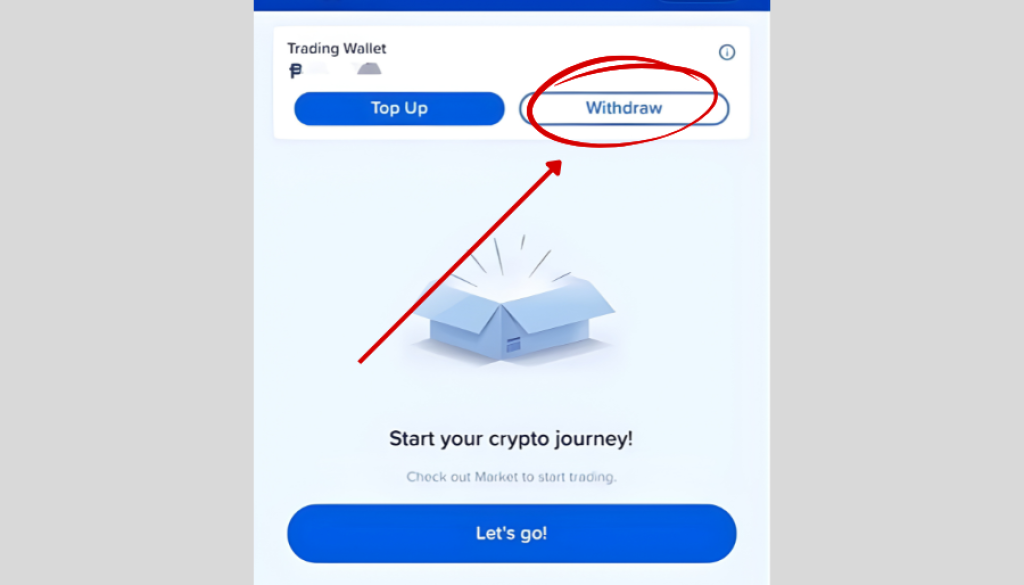
Before finalizing your sale in GCrypto, review the crypto amount, expected PHP after fees, and the current exchange rate. Once confirmed, check if the PHP is in your main GCash wallet. If it remains in GCrypto or a trading wallet, transfer it to your main wallet so you can use it for payments, bills, or ATM withdrawals.
Tips for Safe and Efficient Crypto-to-GCash Conversion
A. Use Reputable Platforms
Stick to well-known exchanges or P2P platforms like Coins.ph, PDAX, or GCrypto. Avoid unknown sellers to minimize the risk of scams and fraud.
B. Check Fees
Be aware of transaction, withdrawal, or conversion fees charged by exchanges, banks, or GCash. Factor these into your calculations to avoid surprises.
C. Confirm Account Details
Always double-check your GCash-linked number and recipient details before completing any transaction. Incorrect information can lead to delayed or lost funds.
D. Monitor Market Rates
Cryptocurrency prices can fluctuate rapidly. Check current rates and sell when conditions are favorable to get the most value from your conversion.
E. Start with Small Transactions
If you’re new to crypto-to-GCash conversions, begin with a small amount to test the process. This helps you understand fees, timing, and platform functionality before committing larger sums.
F. Keep Records
Save transaction receipts or screenshots for reference. This is useful for tracking payments, resolving issues, or reconciling your wallet balances.
Safe Habits for Cashing Out to GCash
Converting cryptocurrency to GCash is a convenient way to use digital assets for payments, bills, shopping, and withdrawals in the Philippines. Whether through trusted exchanges, P2P platforms, or GCrypto, following safe practices like using reputable platforms, checking fees, and confirming account details ensures a secure and efficient conversion. This process allows you to turn crypto into real-world funds quickly and reliably. With GCash, your crypto becomes instantly usable, offering flexibility without relying on traditional banks.
You Might Also Like: