Tradoor0 is a market-making terminal built for Hyperliquid and a handful of connected perpetual venues. Running a market-making bot normally means setting up wallet permissions, venue access, trading parameters, and position limits yourself, then building your own tracking for volume, PnL, and risk. Tradoor0 packages all of that into one interface.
Campaign status: Active
Eligibility: Any trader who connects a wallet, funds an account on a supported perp venue, and runs the Tradoor0 bot
Token status: Not yet confirmed. tPoints may count toward a future distribution
Minimum session size: $10
Points distribution: 10,000 tPoints allocated weekly (every Sunday) based on that week’s trading activity
Claim deadline: No token generation event has been announced
The bot doesn’t touch your funds directly. Your money stays on the venue you choose, and Tradoor0 simply connects to that account to trade on your behalf, then reports back live on PnL, volume, and open positions. For traders who want exposure to market-making without babysitting a terminal all day, that mix of automation and live tracking is the draw, and it’s also what’s powering the project’s tPoints campaign right now.
Am I Eligible?
There’s no waitlist or snapshot. Anyone can qualify by connecting a wallet, funding an account on a supported venue, and running a trading session through Tradoor0. Supported venues include Ostium, Drift Protocol, Paradex, and Hyperliquid.
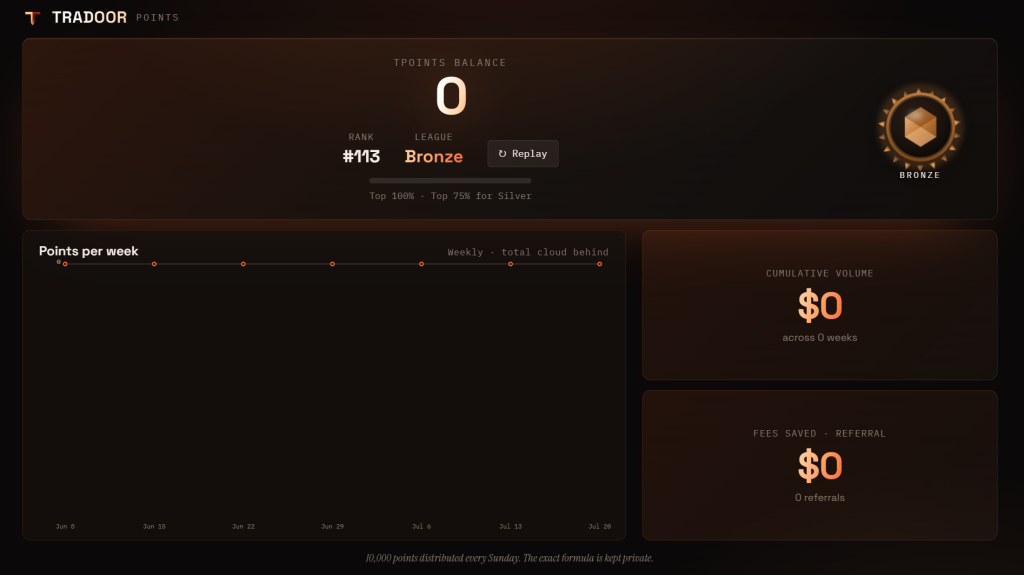
tPoints build up from the trading volume your bot generates. While Tradoor0 hasn’t shared how tPoints are calculated, the Points page shows your running balance, rank, league, weekly progress, and total volume so you can track it yourself. On top of that, the project hands out 10,000 tPoints every Sunday based on that week’s activity.
How to Set Up the Tradoor0 Bot and Start Earning tPoints
To set up the Tradoor0 bot, fund an account on a supported perpetuals venue such as Hyperliquid, connect your wallet in the Tradoor0 app, approve the builder fee and trading agent, then configure and launch a session of at least $10. As of July 2026, the bot’s trading volume earns tPoints, and 10,000 tPoints are allocated every Sunday.
- Pick a venue and fund your account. Choose one supported perpetuals platform (Ostium, Drift Protocol, Paradex, Hyperliquid) and deposit the crypto you plan to trade with directly on that venue’s own interface.
- Connect your wallet to Tradoor0. Open the Tradoor0 app, link your wallet, and approve the builder fee and the trading agent it uses to place orders. Linking a Telegram account will surface bot alerts as the session runs.
- Configure and launch a trading session. Pick your venue, token, and funded account, then set a session size (minimum $10). Choose an execution profile, direction bias, and quote mode, set a target volume and a max loss for the session, and start the bot.
- Monitor the session and your tPoints. While the bot runs, the dashboard shows live PnL, volume, open positions, and fees. A separate Points page tracks your tPoints balance, rank, league standing, weekly progress, and cumulative volume.
- Track referral and leaderboard progress. Applying a referral code unlocks a 10% fee discount. Traders who cross $100,000 in cumulative volume unlock their own shareable referral link, and a weekly leaderboard runs alongside USDC prizes for top volume generators.
Risks of Running the Tradoor0 Bot for tPoints
Running a market-making bot for tPoints is not risk-free just because the reward is speculative. These are the specific things to weigh before starting a session.
1. This is Real Trading, Not a Points-Only Sandbox
The bot places live orders on your funded account. A wide spread, a bad execution profile, or a volatile token can produce real losses on top of trading fees, regardless of how many tPoints you earn.
2. No Token Has Been Confirmed
tPoints are a private, unaudited metric on an unlaunched project. There’s no guarantee Tradoor0 issues a token at all, and if it does, no confirmed conversion rate from points to allocation.
3. Wallet Approvals Carry Contract Risk
Approving a builder fee and a trading agent gives a smart contract permission to act on your funded account. Only approve what the interface requires, and revoke access once you’re done running sessions.
4. Volume-Chasing Increases Exposure
Pushing size or session length purely to climb the leaderboard or earn more tPoints raises your risk without any guarantee it improves a future allocation.
Still Learning How Crypto Airdrops Work?
If this is one of your first airdrop campaigns, start with our crypto airdrops guide page to get a solid foundation on how airdrops work and what to look for. It is also worth checking the most common airdrop farming mistakes before you dive in, since several of them apply directly to campaigns like this one.
Frequently Asked Questions
Still weighing whether to run the bot for tPoints. These are the questions that come up most before traders commit real funds to a session.
Is There a Confirmed Tradoor0 Token?
No. As of this writing, Tradoor0 has not announced a token or a token generation event. tPoints are described as a metric that may factor into a retroactive distribution if one happens.
What’s the Minimum Amount Needed to Start?
The app lists a $10 minimum session notional, though your actual trading account on the chosen venue may have its own separate funding minimum.
Does Tradoor0 Custody My Funds?
No. Funds stay on the perp venue you choose to trade on. Tradoor0 connects to that account to run and manage the bot rather than holding a balance itself.
How Often Are tPoints Distributed?
The app distributes 10,000 tPoints every Sunday based on that week’s trading activity, tracked on the Points page alongside rank and league standing.
Can I Lose Money Just Chasing tPoints?
Yes. The bot still executes live trades, so spread costs, fees, and a bad market move can outweigh whatever tPoints a session earns. Size sessions the way you would any other trade, not as a low-risk way to farm a future airdrop.
More on airdrops: Airdrop guides · Best airdrop websites · Checks before claiming an airdrop · 7 crypto scams to avoid