This article contains affiliate links. If you sign up or buy through them, UseTheBitcoin may earn a commission at no extra cost to you. It does not change what we write. Disclosure Policy
Key Takeaways
- BNB Smart Chain (BSC), called Binance Smart Chain until February 2022, is a blockchain network designed for fast and low-cost transactions, primarily for decentralized applications (dApps) and cryptocurrencies, offering an alternative to Ethereum’s higher fees and slower speeds.
- Setting up BSC on MetaMask allows users to interact seamlessly with BSC-based dApps, store BNB and other tokens, and participate in decentralized finance (DeFi) protocols directly from their wallet.
- By adding BSC to MetaMask, users can access faster transaction speeds and lower fees compared to other blockchains while leveraging the wide range of dApps and services available on BNB Smart Chain.
Do you use a MetaMask wallet and want to start trading on BNB Smart Chain (BSC)? This guide will walk you through the simple steps to set up your MetaMask wallet for BSC.
If you are accustomed to using Uniswap and other Ethereum-based DEXs, you are likely familiar with the high gas fees that can come with transactions. Luckily, there are alternatives to avoid these costs, and one of the most popular solutions is trading on BSC.
What Is BNB Smart Chain (BSC)?
BNB Smart Chain (BSC) is a blockchain that Binance introduced in September 2020 as Binance Smart Chain. It took its current name in February 2022 as part of the BNB Chain ecosystem, which Binance says is community-governed and not controlled by the exchange. Like the Ethereum Network, it allows developers to create smart contracts and cryptocurrencies. BSC operates its own decentralized finance (DeFi) ecosystem, complete with liquidity pools and decentralized exchanges for trading. One of the main benefits of using BSC is its low transaction fees. BNB Chain’s documentation (updated March 2026) puts a typical transaction at around $0.005 or less and the block time at about 0.45 seconds.
Just as Uniswap is the leading decentralized exchange (DEX) for Ethereum, PancakeSwap serves as the primary DEX for BNB Smart Chain. However, before you can connect your wallet to PancakeSwap and begin trading or staking BSC tokens, you will need to set up your MetaMask wallet with the BNB Smart Chain network.
Also Read: What Is Binance Coin (BNB)? All You Need To Know
Prerequisites
Before you start setting up BNB Smart Chain for your MetaMask wallet, you first need to:
- Download the MetaMask wallet in your browser or on your smartphone.
- Setup MetaMask Wallet.
Download MetaMask Wallet
Before you begin, you must download the MetaMask wallet if you do not already have it. You can install MetaMask on your browser or phone by visiting their official website.
MetaMask is a hot wallet, also known as a software wallet, that integrates with your browser and mobile device.
Setup
After downloading the MetaMask wallet, select ‘Create a new wallet’ and choose how to secure it: with a 12-word Secret Recovery Phrase (seed phrase), or by linking a Google or Apple account and setting a password (the browser extension also offers Telegram). Either way, MetaMask cannot recover your wallet for you, so keep the phrase offline or keep the password safe.
For more information on how to use MetaMask, you can do so by reading the article provided below! 👇
Also Read: How To Use MetaMask?
How To Setup BSC On MetaMask?
Now that you have installed MetaMask on your browser or phone, let’s move on to adding BNB Smart Chain. MetaMask lists BNB Chain among its supported networks, so you can usually add it in a few clicks:
Open Your MetaMask Wallet
It should look like the picture below:
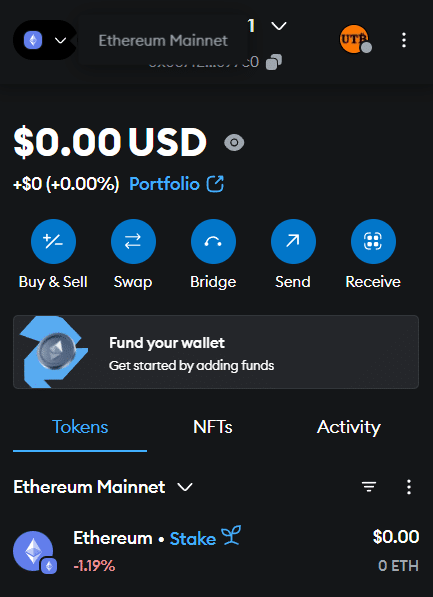
Newer versions of MetaMask show tokens from all enabled networks together. To check whether BNB Chain is enabled, open the networks dropdown at the top of the Tokens tab.
Add “BNB Chain” From Additional Networks
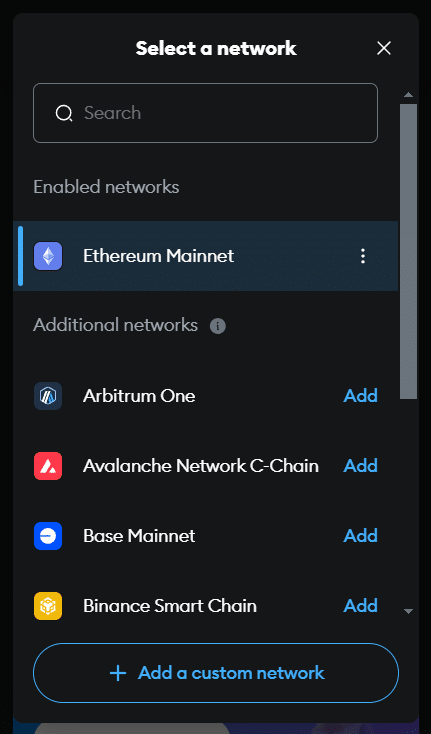
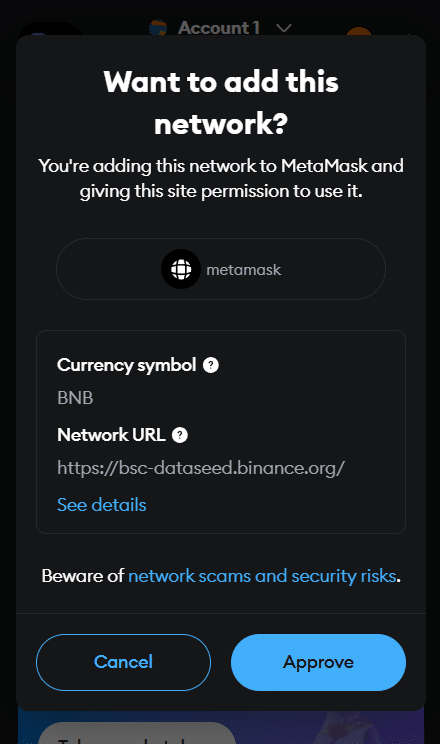
In the browser extension, click the menu in the top right, select ‘Networks’, scroll to ‘Additional networks’ and click ‘Add’ next to BNB Chain. On mobile, tap the networks dropdown at the top of the Tokens tab and tap the ‘+’ icon next to BNB Chain under ‘Additional networks’.
Confirm When Prompted
Or Add BNB Smart Chain Manually
If BNB Chain is not in the list, add it as a custom network: open ‘Networks’ as above, choose ‘Add a custom network’ (on mobile, under the ‘Custom’ tab), enter these details from BNB Chain’s documentation and save:
- Network name: BNB Smart Chain
- Default RPC URL: https://bsc-dataseed.bnbchain.org
- Chain ID: 56
- Currency symbol: BNB
- Block explorer URL: https://bscscan.com
MetaMask does not verify custom networks, so copy these values only from an official source. Adding a custom RPC URL to BNB Smart Chain also switches off MetaMask’s Smart Transactions, including MEV protection.
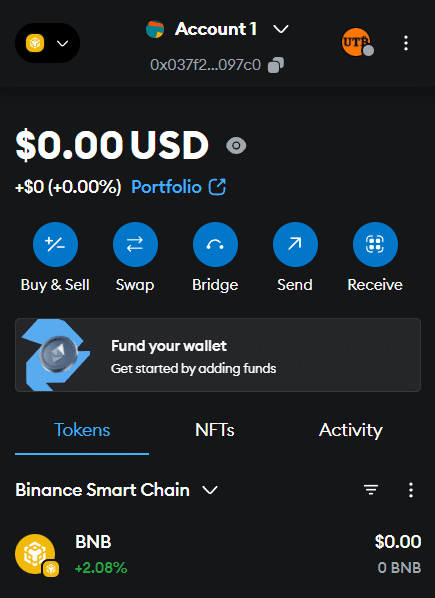
Congratulations! You Are Now Configured With BSC
Buy BNB Tokens To Start Trading
It is important to understand that BSC is not Ethereum-based; the native asset is BNB. This means you will need to buy BNB tokens before you can purchase other tokens on the BSC network. You can acquire BNB on Binance here and enjoy a 20% discount on your trading fees!

Trading on BSC Through PancakeSwap
Now that you have set up BNB Smart Chain (BSC) on your MetaMask, you are ready to start trading! You can connect your MetaMask wallet to PancakeSwap, paste the token’s contract address, and make your purchase.
Notably, trading on the BSC network is a great alternative to using the Ethereum Network, but always exercise caution to avoid potential scammers.
More crypto guides: Guides hub · What is cryptocurrency · What is a seed phrase · 7 crypto scams to avoid