Key Takeaways
- Mining Ethereum is no longer possible in 2026. On September 15, 2022, it switched from proof of work to proof of stake.
- A GPU mining rig can mine different digital currencies, while ASIC miners only work on one specific algorithm.
- A two-GPU mining rig which uses RTX 3060 GPUs will cost you quite near $1,450.
- Profitability in mining depends on revenues from mining operations, electricity costs, network difficulty, efficiency of the device, and price of the coin.
To build a crypto mining rig, it is necessary to obtain hardware that conducts proof-of-work calculations for a cryptocurrency network. The hardware can consist of graphics cards (GPUs), a motherboard, a CPU, memory, storage, and power supply components.
Unlike staking, which makes use of coins in the form of “staked coins,” mining depends on the utilization of processing power to obtain block rewards. In proof-of-work systems, miners are employed for the purpose of processing transactions.
When choosing which components to include in your mining system, consider what kind of cryptocurrency you plan on mining along with whether it’s financially feasible for you to invest in the power and equipment required for your mining system.
Is Building a Mining Rig Worth it?
The choice to build a mining rig in 2026 still depends on cheap electricity, compatible hardware, or strong passion for mining despite the risks associated with investing in machinery only to gain profits from mining.
The profitability of mining will depend on the value of cryptocurrencies as well as the difficulty of mining, block rewards, and competitiveness. The bills for electricity will have to be paid regardless of whether you are making any money.
Building a mining rig involves an initial investment. Before it starts making a profit, the cost incurred in building the mining rig has to be recovered.
Ethereum is not mineable anymore. Ethereum switched from proof of work to proof of stake after completing The Merge on September 15, 2022. Neither GPUs nor ASICs can mine ETH on Ethereum Mainnet anymore. Instead of miners, Ethereum uses validators that stake ETH. The official documentation of the Ethereum Merge can be found on their website.
Those who mine with GPUs can turn their attention to other proof-of-work coins supported by GPUs, such as Ethereum Classic, Ravencoin, and others. The same applies to ASIC miners, who should check out other networks suitable for them.
The question of mining being profitable relies on several factors:
- Electricity cost – Higher rates lead to lower profit after paying for electricity.
- Hardware price – Expensive GPUs or ASICs would take longer to recover the initial cost.
- Mining income – Income from mining varies with the prices of coins, block rewards, and difficulty in mining.
- Hardware efficiency – Efficient hardware means that it produces more hash rate for a given power input.
- Resale price – Used mining equipment may either lose value over time or be harder to sell.
Before buying any hardware, do the calculations. If your anticipated profit is not sufficient, changes in the price and difficulty of coin mining can result in losses.
GPU Rig vs ASIC Miner
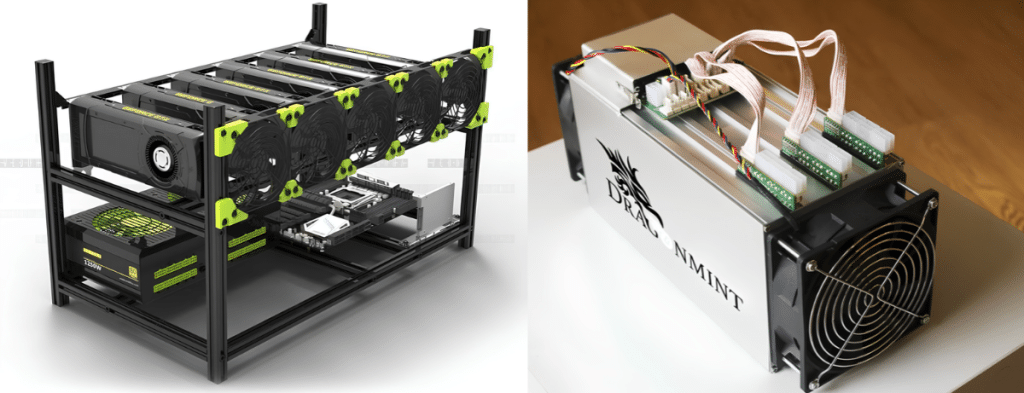
Proof-of-work devices, GPU rigs, and ASIC miner share similarities in their functions, but differ in terms of device specifications, versatility, and costs.
| Feature | GPU Mining Rig | ASIC Miner |
| Hardware | Consists of graphics cards, a motherboard, and other elements. | Specialized mining machine |
| Flexibility | Can mine different coins when algorithms and hardware support them. | Usually limited to compatible algorithms |
| Initial cost | Depends on GPU count and component prices. | Depends on model, efficiency, and market availability |
| Efficiency | Varies by GPU and mining algorithm. | Built mainly for high efficiency with a certain algorithm |
| Setup | Requires assembling and configuring components. | Usually a complete mining unit |
| Noise and heat | Depends on GPU count, fans, and power draw. | Can be very loud and produce a great amount of heat |
| Resale | GPUs may have uses outside mining. | Resale depends heavily on mining demand |
| Best fit | Users who want flexibility or already own GPUs. | Users targeting a specific coin and algorithm |
While it may be easier to use a GPU for mining, with the exception of it is less efficient compared with ASIC miners that can mine specific algorithms, but the potential of the GPU may be limited when the economics of mining for that particular coin change.
Neither option guarantees profit. Compare the specific hardware’s hash rate and power usage against the current mining environment for the coin in question.
Parts List and Costs
The example given provides the designed equipment for mining with a two-GPU configuration fitted with NVIDIA RTX 3060 12GB graphics cards. Prices are assumed dollar equivalents according to current or previously used GPU and average component prices. No reliable official quotes exist.
Recently used RTX 3060 12GB GPUs are expected to be priced at around $ 295 based on current US market data. Actual prices depend on several factors such as product condition, seller, shipping method, etc.
GPUs
The primary component in mining with a graphics-card rig is the GPU. The hash rate and power consumption of a GPU depend on the mining algorithm and the chosen settings. The configuration will feature two used RTX 3060 12GB graphics cards for the purpose of this demonstration.
| Component | Quantity | Estimated price |
| NVIDIA RTX 3060 12GB GPU, used | 2 | $580 |
| GPU subtotal | $580 |
The RTX 3060 is a typical cryptocurrency mining graphics card. This, however, does not mean that it is guaranteed to yield the greatest profits by 2026.
Don’t forget to check the stats of your GPU before getting it, such as hash rate, energy consumption, RAM requirements, and value on a resale market. The results from one algorithm cannot be applied to judge its performance with others.
Motherboard and CPU
The motherboard connects all other parts of the computer, along with GPUs. Important things to take into consideration while building a mining rig are PCIe slot availability, processor type, RAM compatibility, and the ability of other components to work together with GPUs.
| Component | Estimated price |
| Motherboard with suitable PCIe connectivity | $120 |
| Entry-level compatible CPU | $60 |
| 16GB RAM | $35 |
| 500GB SSD | $30 |
| Subtotal | $245 |
Pick the motherboard based on how many GPUs you would like to install. You simply require a motherboard that has 2 PCIe slots when you want to install 2 GPUs, but if you’re setting up a very large mining rig with more than 2 GPUs, then more PCIe slots or risers or even dedicated mining motherboards would be required.
Power Supply
The power supply unit (PSU) allows the GPUs and all other parts of the computer to be supplied with power.
If you are planning to set up a dual-GPU system, be sure to choose a good PSU that has enough wattage to power both the GPUs, the CPU, motherboard, and the rest of the components of the PC.
Look for the fact that it is capable of supplying more power than what is required, even though it should not operate at maximum capacity for long periods.
| Component | Estimated price |
| Quality 850W PSU | $150 |
The required output depends on the GPUs’ power ratings. Follow the manufacturer’s recommendations for the power requirements and do the calculations for your whole system before you get the PSU.
Don’t experiment with cheap power supply units or extension cords to save money. Electric safety comes first.
Frame, Risers and Cooling
A mining framework creates room for the Graphics Processing Units (GPUs) while enhancing ventilation. PCIe risers enable the GPUs to connect to the motherboard if they are not able to connect to the motherboard using its port directly.
| Component | Estimated price |
| Open-air mining frame | $70 |
| Two PCIe risers | $30 |
| Additional cooling fans | $40 |
| Subtotal | $140 |
The risers should also be compatible with the motherboard and the GPUs in use. All the cables and connectors used must be properly rated for the load and should be in good condition.
Estimated Total Build Cost
| Component group | Estimated cost |
| Two used RTX 3060 GPUs | $580 |
| Motherboard, CPU, RAM and SSD | $245 |
| Power supply | $150 |
| Frame, risers and cooling | $140 |
| Estimated total | $1,115 |
The following is an example of a US build and is not meant to suggest the purchase of these parts at the indicated prices. Shipping and handling costs, sales tax, tools, replacement parts, and possible electrical upgrades have not been included in the total.
The total of this example build does not take any discounts into account and does not take into consideration any changes in the price of components that are in use.
Step-by-Step Build
Once parts have been fitted, verified, and been made sure of their compatibility, the next step is creating the mining rig.
1. Installing the Frame and Motherboard
Set the mining framework on a steady surface that can allow it to breathe. Go ahead and place the motherboard on the frame using the relevant ports and screws.
Ensure that the framework is not exposed to moisture, dirt, crowds of people, and places where accidents are likely to occur, as far as touching the exposed electrical components is concerned.
2. Install the CPU, RAM, and Storage
Make sure to follow the instructions given by the manufacturer when it comes to fitting the CPU into the motherboard and connecting the proper cooler, memory, and SSDs.
Please check if the CPU cooler is attached properly. Also, make sure all the power connections to the motherboard are firm before powering on.
3. Set the Power Supply
Set up the power supply unit and connect the main power cable to the motherboard, together with the cable that supplies power to the central processing unit.
Make sure you followed the specifications of the GPU power supply cables that correspond to the GPU model. Never force the connectors to fit or connect cables that could be broken.
4. Put the GPU on and Install Risers
Attach the GPU to the motherboard via PCIe or through GPU-specific risers. Ensure that the GPU is firmly fitted into the frame, so it doesn’t move and possibly damage the risers.
5. Check the Connections
Before starting the rig, check:
- Motherboard and CPU power connections
- GPU power connections
- Riser connections
- RAM installation
- CPU cooler and fans
- Frame stability
- Cable routing and airflow
Do not power on the rig if a cable, riser, or connector appears damaged.
6. Activate the System and Install the Software
Connect the monitor, mouse, and keyboard. Switch on the system and enter the BIOS or UEFI if needed. Install the appropriate operating system and GPU drivers. Before you proceed with the installation of the mining software, make sure that the system recognizes both video cards.
Sample Profitability Calculation
The given instance illustrates the impact of electricity on a two-GPU system. The assumed revenue is used for calculation purposes. The revenue number is not current mining revenue or a guarantee by any means.
| Item | Example |
| Estimated rig cost | $1,115 |
| Total power draw | 500W |
| Monthly electricity use | 360 kWh |
| Electricity rate | $0.17/kWh |
| Monthly electricity cost | $61.20 |
| Assumed mining revenue | $4.50/day |
| Estimated monthly revenue | $135 |
| Estimated monthly operating profit | $73.80 |
Calculation:
Monthly revenue − monthly electricity cost = operating profit
This is actually the revenue before deducting fees of the pool, repairs, overhead expenditures related to cooling beyond the power consumed by the rig, taxes, and depreciation of the equipment. With these figures for income, the user would recover the investment of $1,115 in approximately one and a half years, provided that its income and electricity cost do not change. In reality, the income and difficulty in mining may vary over time.
If the same rig earned only $2 per day:
- Monthly revenue: $60
- Electricity cost: $61.20
- Operating Result: −$1.20 per month
This is why you should calculate profitability before buying parts. A positive operating result does not mean the investment is worth it.
Noise, Heat, and Safety
Mining machines can operate for prolonged periods of time and produce a lot of heat. A graphics card machine with a single GPU may be loud enough to disturb people in nearby premises. Before building this rig, it is important to consider where the machine will be placed and whether there is a possibility to manage the heat produced.
Noise
In terms of noise, GPU fans can be very loud as a result of constant workloads. ASIC miners may produce a lot more noise due to the powerful fans used to cool them. Therefore, it is recommended to place these machines away from bedrooms or other places shared with other people. Additionally, they should not be put into a closed cabinet without ventilation.
Heat
The mining rig produces heat. Therefore, make sure there is proper airflow to avoid GPU throttling, crashes, and degradation. Monitor the temperature and speed of fans, and regularly remove dust. If air conditioning is necessary, take the power consumption of air conditioning into consideration in the calculation of profit and loss.
Frequently Asked Questions
Here are answers to common GPU mining questions.
Which cryptocurrency can one mine nowadays with a GPU?
Mining proof-of-work cryptocurrencies like Ethereum Classic (ETC) and Ravencoin (RVN) can be done using GPUs. It is important to calculate profits based on the computer setup, price of the currency, problems in the network, and the electricity bill. Ethereum Mainnet stopped mining in September 2022 after switching to proof of stake. Currently, ETH is held by validators.
How much does creating a mining platform cost?
The cost depends on the number of GPUs, model of hardware, motherboard, PSU, frame, risers, and cooling. In the example used in this article with the two-GPU configuration, the estimated cost is $1,115 at US prices. Check current prices and calculate expected earnings before purchasing.
Can I Mine Crypto With a Gaming PC?
If sufficient hardware is available in the computer and cryptocurrency mining is possible with its algorithm, the answer will have to be “yes”. However, mining increases electricity consumption, produces heat, and creates noise. Before beginning mining on a gaming computer, it is advisable to analyze the feasibility of mining such a cryptocurrency given the cost involved and the problem of excessive heat produced and noise generated.
More crypto guides: Guides hub · What is cryptocurrency · What is a seed phrase · 7 crypto scams to avoid